
How Can We Help?
How to Eliminate Spam from your Mailbox
Spam controls can reduce unwanted email, but no filter can guarantee that every unwanted message is blocked or every legitimate message is delivered.
Review cPanel Spam Filters
Open Spam Filters in cPanel. The inspected account has Apache SpamAssassin scoring enabled by the hosting provider. The page shows the current threshold and whether Spam Box and Auto-Delete are enabled. These are account settings, not a promise that every hosting account has identical defaults.
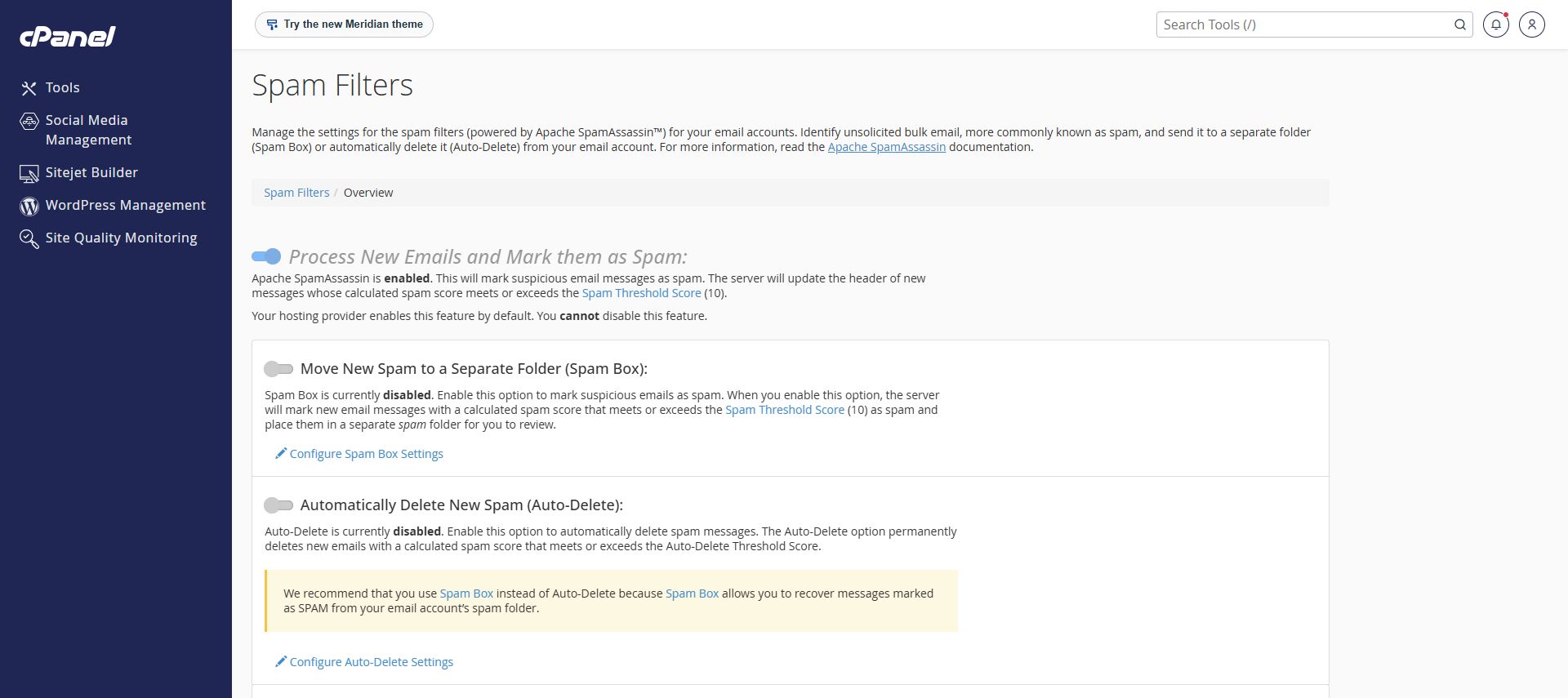
Prefer reviewing suspicious mail to automatic deletion
Spam Box places messages identified as spam in a separate folder for review. Check that folder regularly for legitimate mail. Auto-Delete permanently removes qualifying new messages; avoid enabling it unless you understand the risk of losing legitimate email.
Adjust cautiously
The Spam Threshold Score affects which messages are classified as spam. Record your current settings and ask support before making broad changes. Do not copy another account’s threshold or assume that allowlisting a sender bypasses every security check.
What about BoxTrapper?
cPanel also exposes BoxTrapper on the inspected account. It is a separate challenge-response approach, not the same as spam scoring. It can interrupt legitimate automated mail because an unattended sender may not respond to a challenge. Ask support before adopting it.
For missing mail, follow the email troubleshooting guide. Use filters alongside cautious handling of suspicious messages.
Need assistance? Contact Rhino Hosting Support. Include the relevant error and application version, but never send your password.
Content reviewed: 29 September 2026. Controls checked in cPanel 138.0.10, Jupiter. Account-changing actions were not performed for this guide.