
How Can We Help?
What are my email server settings?
Use the settings shown in cPanel for your own email account. The correct server name can vary by domain, so do not copy the sample below unless it matches your account.
Find the settings for your mailbox
- Sign in to cPanel for the domain that hosts your mailbox.
- Open Email Accounts.
- Select Manage beside the mailbox.
- Open Connect Devices and use the secure settings displayed there for your email app.
Use the full email address as the username and the password for that email account. Incoming mail uses IMAP or POP3. IMAP is generally recommended when you use the mailbox on more than one device because messages stay synchronised with the server. Use SMTP for outgoing mail. Enable authentication and select the security method and port shown in cPanel.
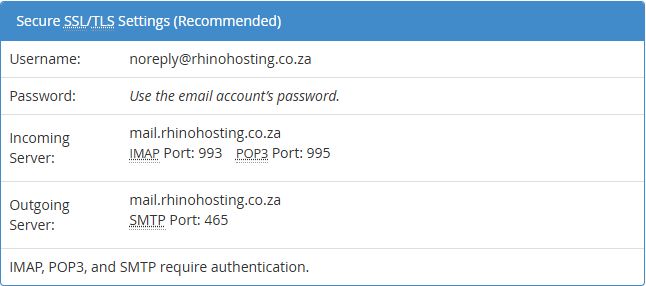
Verified sample settings
The following values were checked for one Rhino Hosting mailbox. They are an example, not a guarantee that every domain uses the same hostname. Check Connect Devices for your own mailbox before setting up an app.
| Connection | Server for the verified sample | Security | Port |
|---|---|---|---|
| Incoming IMAP | mail.rhinohosting.co.za | SSL/TLS | 993 |
| Incoming POP3 | mail.rhinohosting.co.za | SSL/TLS | 995 |
| Outgoing SMTP | mail.rhinohosting.co.za | SSL/TLS | 465 |
Authentication is required for IMAP, POP3 and SMTP. Use your full email address as the username and the mailbox password when your app asks for credentials. Do not use an unsecured connection. If your cPanel screen shows different secure values, use the values for your mailbox.
If the connection fails, compare the account username, password, server name, port and security method with the values shown by cPanel. Contact Rhino Hosting Support with the email app and exact error message if you still need help. Do not send your password.
Instructions reviewed: 29 September 2026. Screenshots: cPanel 138.0.10, Jupiter interface.