

Email protocols handle different parts of sending and reading a message. SMTP is used for sending, while IMAP and POP3 are used to access stored mail. Understanding those roles helps you choose the correct setup without confusing mailbox access, connection encryption and sender authentication.
Step 1: Submit the message to your mail service
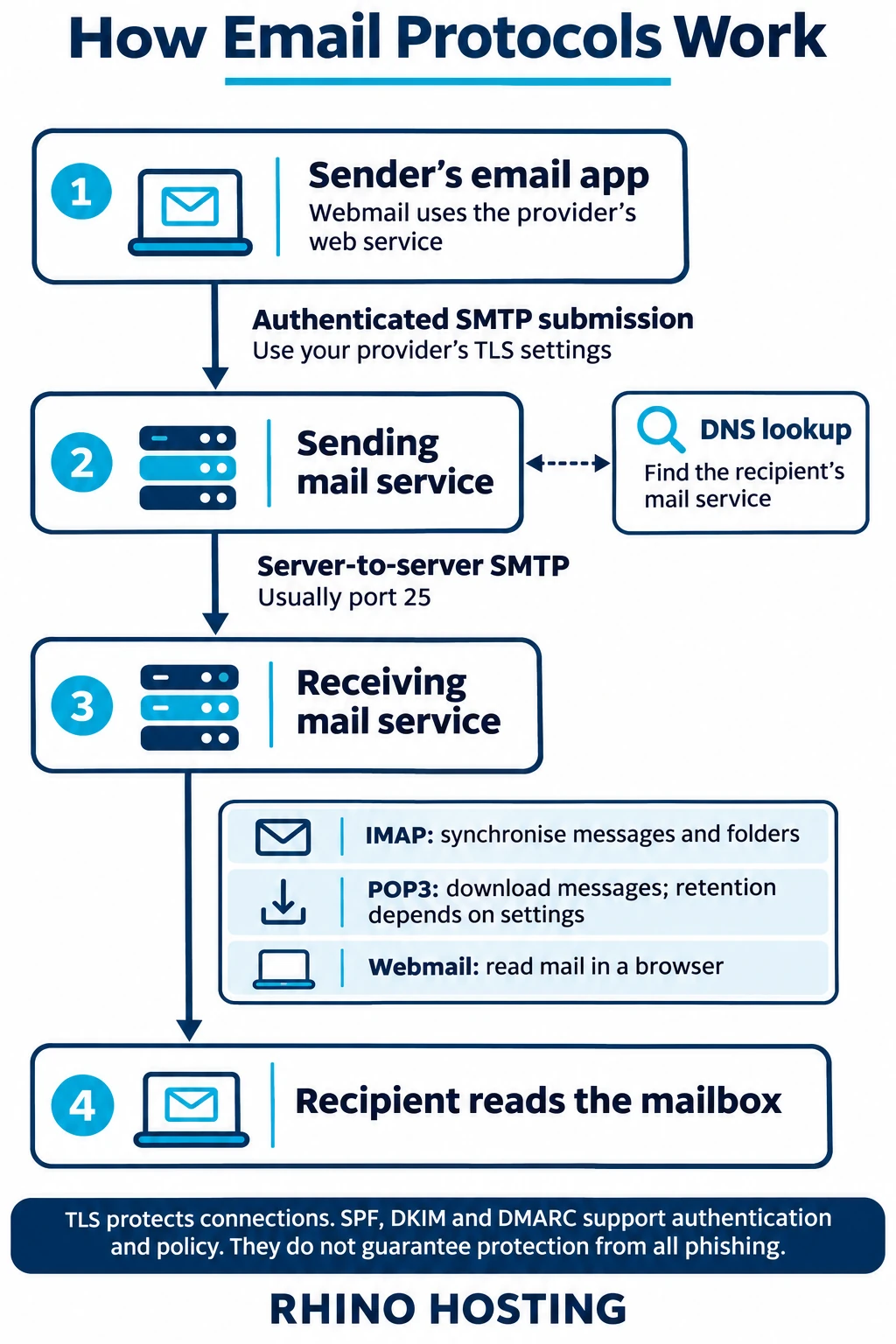
When you send from an email application, it normally submits the message to your provider’s outgoing mail service using authenticated SMTP. Submission is separate from the SMTP relay used between mail services. Webmail hands your message to the provider through its web interface.
Use the server name, authentication and encrypted-connection settings supplied for your own account. SMTP submission commonly uses port 465 with implicit TLS or port 587 with STARTTLS, where supported and configured correctly. Port 25 is commonly used for server-to-server relay; it is not a universal recommendation for configuring an email application.
Step 2: Find the recipient’s mail service
The sending service normally looks up the recipient domain’s MX records in DNS to find its mail-exchanger hostnames. Those hostnames are then resolved to IP addresses. An MX record identifies a mail host, rather than directly containing the destination IP address.
Step 3: Transfer the message and handle delivery attempts
The sending service transfers the message to the receiving service using SMTP. If delivery is temporarily unavailable, the sending service may queue the message and retry according to its delivery policy. Permanent failures, such as a rejected recipient address, may result in a delivery-status notification instead. Delivery is not guaranteed simply because you clicked Send.
Mail formatting, filtering and authentication checks can happen at different stages. They are not one universal sequence that every email service performs identically.
Step 4: Read the mailbox using IMAP, POP3 or webmail
- IMAP: lets compatible applications work with messages and folders on the server. Read status and folder changes can synchronise across connected devices. Applications may also keep local offline copies; synchronisation is not an independent backup.
- POP3: downloads messages to an application. Whether copies remain on the server depends on client settings and provider policy. POP3 does not provide the same server-folder and read-status synchronisation as IMAP.
- Webmail: lets you access the mailbox through a browser rather than configuring IMAP or POP3 in an application.
For encrypted mailbox access, common implicit-TLS ports are IMAP 993 and POP3 995. Follow your provider’s current account settings rather than assuming a port number alone makes a connection secure. Do not disable certificate checks to make a connection work.
Our guide to email account types and access methods explains the choices in more detail.
Step 5: Distinguish encryption from sender authentication
TLS protects a connection between systems. SPF, DKIM and DMARC have different roles in checking authorised domain use and communicating policy:
- SPF: allows a domain owner to identify servers authorised to use the domain in SMTP envelope-sender or HELO identities. It does not by itself validate every visible From address.
- DKIM: adds a cryptographic signature associated with a signing domain. A receiver can verify the signature and the integrity of the signed content.
- DMARC: evaluates alignment between the visible From domain and a passing SPF or DKIM result, and publishes the domain owner’s handling policy and reporting preferences. Receiving services apply their own handling decisions.
These mechanisms can help reduce certain forms of domain impersonation, but do not guarantee inbox placement or protection from all phishing, lookalike domains or compromised accounts. TLS is not the same as end-to-end message encryption. This explanation is not an audit of an individual domain’s configuration or a claim that every Rhino customer has the same records or policy.
A simplified view of the email journey
Need help with your email setup?
Use the settings supplied for your account, and check with your provider before changing an existing mailbox configuration. If you need domain-based email, view Rhino Hosting’s email-hosting service. For help with a current setup or migration requirements, contact Rhino Hosting.